
Draw the weld joint detail and pass sequence of your WPS
WeldSketch is the web editor for the sketches of a welding procedure: start from one of 166 joint geometries, adjust it with dimensions and weld symbols, number the passes and export PNG, SVG or A4 PDF ready for your WPS or PQR.
Designing is free. Export with a Pro or Team plan, or unlock a single drawing with one credit.
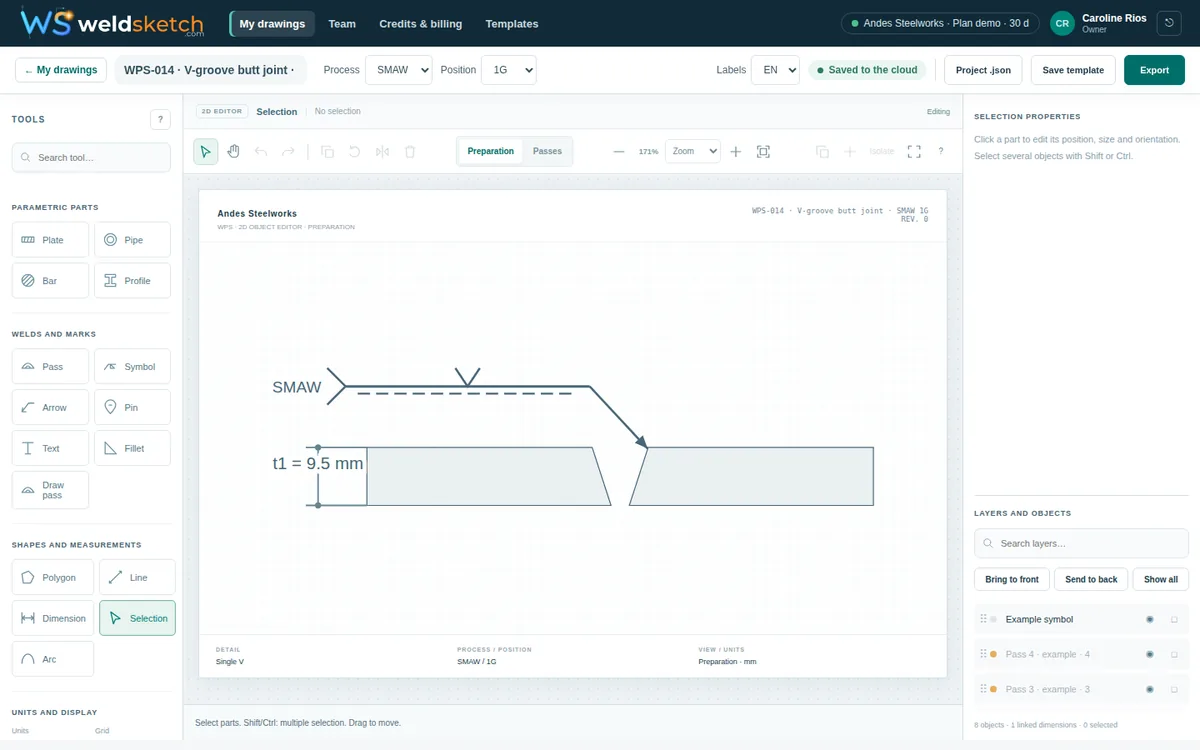
Try it here, no sign-up
Move the thickness, angle and root opening
This is how WeldSketch feels: every dimension changes the drawing instantly. The editor has 166 geometries, symbols, linked dimensions and PNG, SVG and PDF export.
For welding engineers, inspectors and quality managers
Consistent welding documents, without fighting your drawing software
Every WPS needs its sketches, and they are usually drawn by hand, in a generic editor or copied from another procedure. WeldSketch standardizes them.
Consistency across the team
Everyone draws with the same joint catalog, the same symbols (AWS A2.4 / ISO 2553) and the organization's templates.
Control and traceability
Per-person roles (owner, administrator, editor, viewer), an organization activity log and mandatory two-step verification if you require it.
Deliverables ready to use
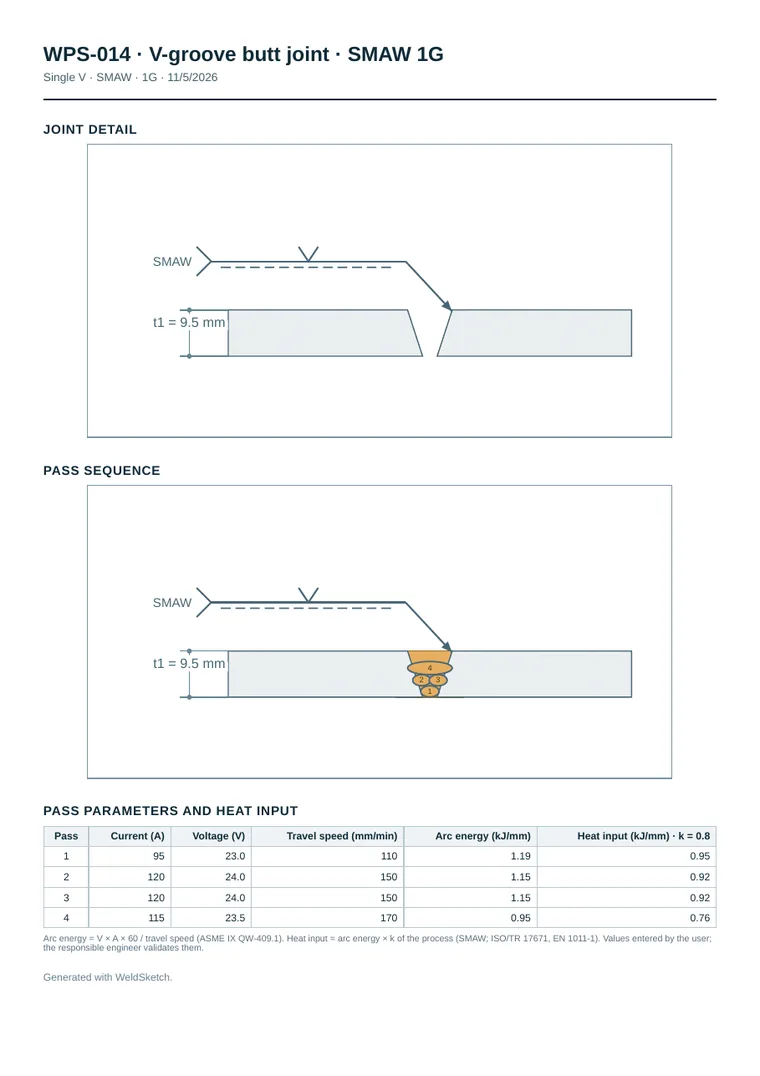
PNG with white or transparent background, vector SVG and an A4 PDF sheet with the joint detail and the pass sequence.
No rework
Drawings are saved in the cloud with version control: nobody overwrites someone else's work.
How it works
From joint to file in three steps
Pick the joint
Start from one of 166 geometries (butt, fillet, corner, lap, pipe, nozzles…) or one of 44 complete templates by process and position.
Adjust the detail
Change thickness, angle, root opening and root face; add linked dimensions, weld symbols and notes; draw and number the passes.
Export and share
Download PNG, SVG or an A4 PDF sheet with both views, with labels in English or Spanish, and share it with your team.
Features
Everything you need to draw a procedure
166 joint geometries
Butt (square, V, bevel, U, J, flare and double-sided), fillets, corners, laps, pipe, nozzles, tube-to-tubesheet and surfacing.
44 complete templates
Editable examples by process (GMAW, SMAW, GTAW, FCAW, SAW) and position (1G, 2F, 5G…), with symbol, dimensions and passes.
Object-based 2D editor
Parametric parts, lines, linked dimensions, layers, align and distribute, undo and redo, shortcuts and zoom. Mouse, keyboard or touch.
Welding symbols
AWS A2.4 and ISO 2553 (system A) conventions: type, size, contour, finish, field weld and weld-all-around.
Pass sequence and heat input
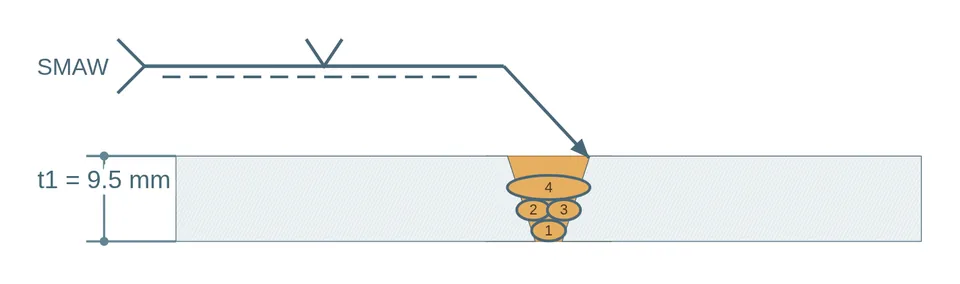
Draw, number and order the passes. Enter current, voltage and travel speed and WeldSketch automatically calculates the arc energy and heat input of each one (kJ/mm).
English and Spanish
Interface and drawing labels in English or Spanish: ideal for projects with clients abroad.
Your organization's templates
Save your standard details and share them so everyone starts from the same base.
Real security
Two-step verification, passkeys, data isolated per organization and an activity log nobody can alter.
What you get
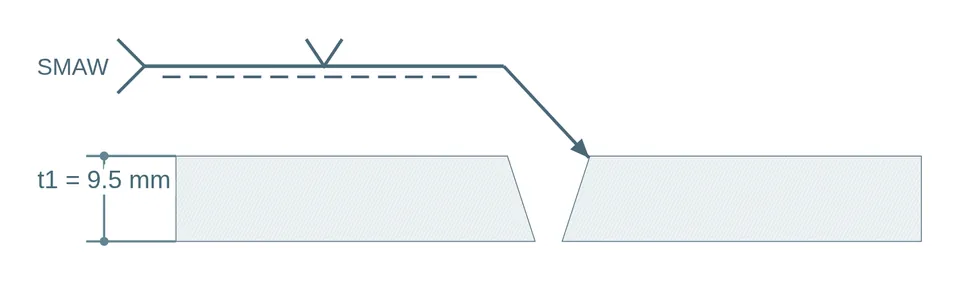
Clean images and sheets with the dimensions and symbols you drew. Example generated with WeldSketch.
For teams and companies
Control over how your procedures are documented
Built for workshops, engineering firms and contractors that issue many procedures and need order.
Per-person roles
Owner, administrator, editor or viewer: everyone can do what they should.
Shared templates
Your standard joint detail, available to the whole organization.
Activity history
Who created, changed, exported or deleted each drawing, and from where. It cannot be modified.
Mandatory second factor
Require two-step verification for everyone in the organization.
Design for free. Pay when you need it
Try the full editor before you decide. For everyday work, a plan with unlimited drawings; for a single drawing, credits.
Free
- Up to 5 drawings in preview
- Full editor and library
- 166 geometries and 44 templates
- Watermarked PNG preview
Credits
3 credits for USD 12
- 1 credit unlocks 1 drawing for 90 days
- Credits never expire
- The last exported version can always be downloaded
Pro
or USD 180 per year (2 months free)
- Unlimited drawings
- Export and edit with no time limit
- Heat input per pass on the PDF sheet
Team
or USD 500 per year · + USD 8/month per extra person
- Everything in Pro, up to 5 people
- Roles and organization templates
- Activity log and mandatory 2-step
Everything paid includes
- PNG, SVG, A4 PDF and project without watermark
- AWS A2.4 / ISO 2553 symbols
- Labels in English or Spanish
- Secure card payment
Prices in US dollars. Secure card payment (Visa, Mastercard, American Express) processed by Wompi, part of Grupo Bancolombia; your bank converts the amount to your currency.
Frequently asked questions
What is WeldSketch?
A web editor to draw the sketches that go with a welding procedure: the joint detail (preparation, dimensions and symbols) and the pass sequence. It runs in the browser, nothing to install.
Does it generate the complete WPS?
No. WeldSketch creates the joint and pass images that are included in a WPS or PQR. You document and validate the parameters, materials and procedure qualification with your own format and code.
Does it comply with ASME IX, AWS D1.1 or ISO 15614?
It is a drawing tool: it does not qualify procedures or certify code compliance. It uses the AWS A2.4 and ISO 2553 symbol conventions, and the templates are examples your engineer or inspector must review.
Can I try it for free?
Yes. You can create an account, save up to 5 drawings and use the full editor for free. Drawings carry a watermark and you can download a PNG preview; to export without it you choose a plan or one credit per drawing.
Which formats can I export?
PNG (white or transparent background, any size you choose), vector SVG, an A4 PDF sheet with both views and a .weldsketch.json project file for backup or to move between accounts.
Are my drawings private?
Yes. They belong to your organization, are isolated from all others and are visible only to people with access. Platform staff see control data, not the content of your drawings.
Does it work on a phone or tablet?
The editor supports touch and adapts to small screens. For comfortable drawing we recommend a tablet or computer.
Which languages does it support?
English and Spanish. The organization chooses the interface language, and each drawing has its own language for labels and exported file names.
Who is behind WeldSketch?
It is built and operated by JNTECH in Colombia, with the idea and support of welding industry professionals.
Your next WPS, with drawings you can be proud of
Create your free account and draw your first joint in under five minutes.